
Latest Version
Update
September 14, 2026
September 14, 2026
Developer
Digi-Zilla
Digi-Zilla
Categories
Tools
Tools
Platforms
Android
Android
Downloads
0
0
License
Free
Free
Package Name
com.duetatech.appblockwithoutvpn
com.duetatech.appblockwithoutvpn
Report
Report a Problem
Report a Problem

More About KillSwitch – Internet Blocker
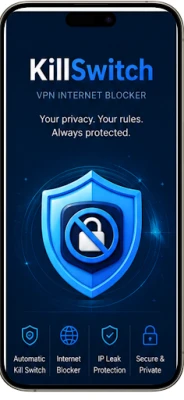
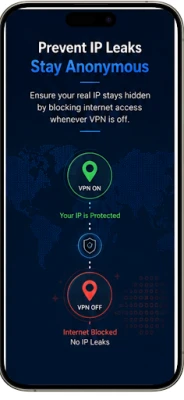
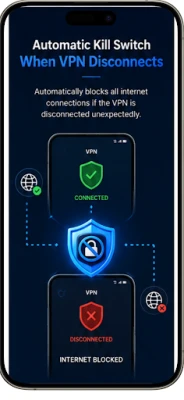
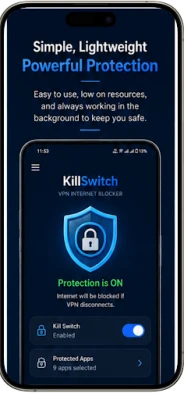
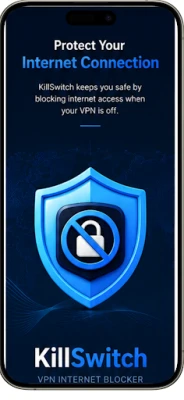
KillSwitch – Internet Blocker helps you stay in control of which apps can access the internet when you're not connected to a VPN.
HOW IT WORKS
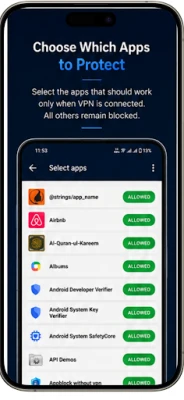
Choose any app installed on your device and mark it as blocked. KillSwitch helps prevent your selected apps from being used when your VPN protection is not active.
From that moment on, KillSwitch works in the background according to your selected protection settings, helping you maintain a VPN-only setup without having to manually check your VPN status.
WHY USE KILLSWITCH
* Prevent selected apps from accessing the internet when VPN protection is not active
* Enforce a "VPN-only" setup for work or personal apps
* Reduce the risk of using selected apps over an unprotected connection
* Stay in control without needing to remember to check your VPN status yourself
ACCESSIBILITY SERVICE
KillSwitch uses the Android Accessibility Service as part of its app-blocking functionality. The Accessibility Service helps KillSwitch detect and respond when a selected app is opened so that the configured protection can be applied.
The Accessibility Service is only enabled after you manually grant the required permission in Android Settings. You can disable the Accessibility Service at any time through your device settings.
KillSwitch does not use the Accessibility Service to read or collect personal messages, passwords, financial information, or other sensitive personal content.
PRIVACY FIRST
KillSwitch is designed to process its protection functionality locally on your device. The app does not require an account and does not sell personal information.
SIMPLE TO USE
1. Open KillSwitch and select the apps you want to protect
2. Enable the required Accessibility Service permission when prompted
3. Configure your protection settings
4. Use your VPN normally
5. KillSwitch applies your selected protection automatically in the background
Whether you're a privacy-conscious user, a remote worker using a company VPN, or someone who wants an additional safety layer, KillSwitch helps keep your selected apps protected when your VPN protection is not active.
Choose any app installed on your device and mark it as blocked. KillSwitch helps prevent your selected apps from being used when your VPN protection is not active.
From that moment on, KillSwitch works in the background according to your selected protection settings, helping you maintain a VPN-only setup without having to manually check your VPN status.
WHY USE KILLSWITCH
* Prevent selected apps from accessing the internet when VPN protection is not active
* Enforce a "VPN-only" setup for work or personal apps
* Reduce the risk of using selected apps over an unprotected connection
* Stay in control without needing to remember to check your VPN status yourself
ACCESSIBILITY SERVICE
KillSwitch uses the Android Accessibility Service as part of its app-blocking functionality. The Accessibility Service helps KillSwitch detect and respond when a selected app is opened so that the configured protection can be applied.
The Accessibility Service is only enabled after you manually grant the required permission in Android Settings. You can disable the Accessibility Service at any time through your device settings.
KillSwitch does not use the Accessibility Service to read or collect personal messages, passwords, financial information, or other sensitive personal content.
PRIVACY FIRST
KillSwitch is designed to process its protection functionality locally on your device. The app does not require an account and does not sell personal information.
SIMPLE TO USE
1. Open KillSwitch and select the apps you want to protect
2. Enable the required Accessibility Service permission when prompted
3. Configure your protection settings
4. Use your VPN normally
5. KillSwitch applies your selected protection automatically in the background
Whether you're a privacy-conscious user, a remote worker using a company VPN, or someone who wants an additional safety layer, KillSwitch helps keep your selected apps protected when your VPN protection is not active.
Rate the App
Add Comment & Review
User Reviews
Based on 0 reviews
No reviews added yet.
Comments will not be approved to be posted if they are SPAM, abusive, off-topic, use profanity, contain a personal attack, or promote hate of any kind.














More »

Popular Apps

Free Fire: 9th AnniversaryGARENA INTERNATIONAL I

World War 2-FPS Shooting GamesEdkon Games GmbH

PUBG MOBILE 4Level Infinite

Big Rig Racing: Drag racingMobirate

World War Heroes — WW2 PvP FPSAzur Interactive Games Limited

World War 2:WW2 Strategy GamesJoynow Studio

Grand Theft Auto: San AndreasRockstar Games

Last Island of SurvivalHK Hero Entertainment Co., Limited
Dawn of Zombies: Survival GameRoyal Ark

AoD Vikings: Valhalla GameRoboBot Studio
More »
Editor's Choice
Last Island of SurvivalHK Hero Entertainment Co., Limited

Grim Soul: Dark Survival RPGBrickworks Games Ltd

Craft of Survival - Gladiators101XP LIMITED

Last Shelter: SurvivalLong Tech Network Limited
Dawn of Zombies: Survival GameRoyal Ark

Merge Survival : WastelandStickyHands Inc.
AoD Vikings: Valhalla GameRoboBot Studio

Viking Clan: RagnarokKano Games

Vikings: War of ClansPlarium LLC

Asphalt 9: LegendsGameloft SE